App for musicians On the App Store and Google Play

Your
prompter
on stage.

Setlists, chords, backing vocals markers, scroll calibrated to your song. On iOS and Android, distraction-free during your live show.
  • iOS · Android
  • No account
  • iCloud / Drive sync
  • Free to try
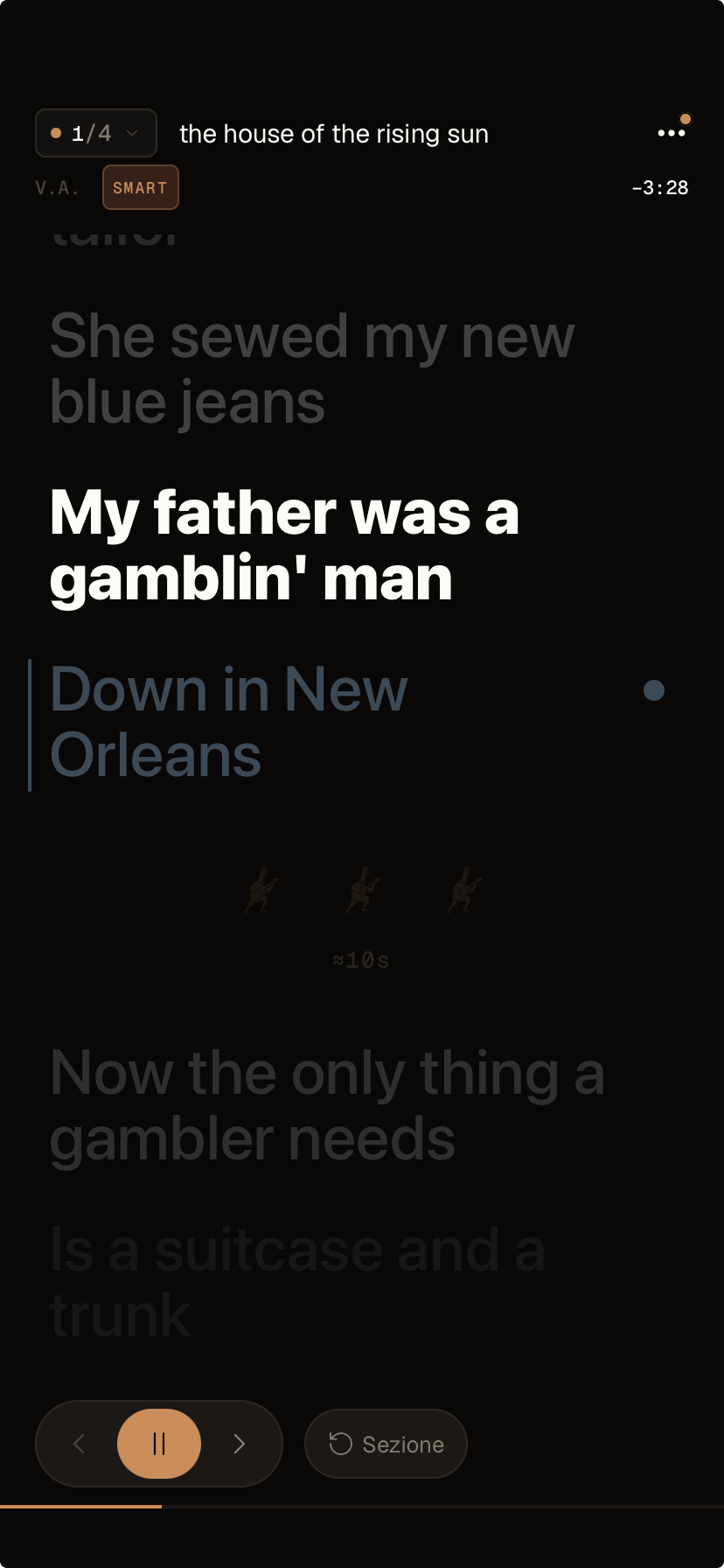
Onset in stage mode: the song House of Rising Sun with the current line highlighted, the backing vocals marker and the break timer with sound cues.
The problem

On stage, PDFs and screenshots
don't help. They distract.

For years I played and sang live using PDFs, screenshots and ChordPro files open across different apps. Every gig was a small logistical disaster. Onset is the app I always wished I had.
RR, Onset User
01 / Scroll

PDFs and screenshots don't scroll with time.

You end up swiping with your finger while holding the guitar. Or worse, someone has to turn the page for you.

02 / Chords

Chords and lyrics live in different apps.

The tabs or chords in one browser tab, the lyrics in another. You change song, you risk losing your place.

Am
C
03 / Setlist

The setlist scattered across DMs.

The order changed ten times, "sorry, did you send the new list?". The drummer doesn't know what you're playing now.

How it works

From copy-paste
to the stage in four moves.

No account. No twenty-slide onboarding. Open the app and in a few minutes your first song is ready.

Step
01

Import.

Paste your own lyrics and chords in ChordPro, or import them from a PDF. You bring the lyrics: Onset does not download them for you.

[Am]My [C]mother
[D]was a [F]tailor
{cori: Down in New Orleans}
Step
02

Build.

Drag songs into the concert setlist. Reorder on the fly, even during rehearsals.

01
Rising Sun
02
Wagon Wheel
03
Folsom Prison
Step
03

Calibrate.

Tap the lines in time while you listen. Or look up the song's timing in the community database: it attaches to your lyrics, and from there they scroll on their own.

Anchors 14 / 18 lines
0:12
0:18
0:31
Step
04

Play.

Stage mode: screen always on, no accidental swipes and anti-touch lock. Just lyrics, chords, backing vocals.

Am
My mother was a tailor
D
she sewed my new blue jeans
Features

Everything you need.
Nothing that gets in the way.

Every Onset feature was born from a real problem, during a Live.

01 / Chords

Transpose any song, without rewriting.

Set the most comfortable key for your voice on every song in the setlist. Onset transposes the chords accordingly.

02 / Scroll

Calibrated to your version.

Line-by-line timing anchors: tap the lines to the beat, or pull the timing from the database and attach it to your lyrics. Live, you adjust the tempo with a tap on the line.

03 / Backing vocals

Lead or Backing on every song.

Mark the backing vocals in the lyrics and, song by song, choose whether you'll sing the lead vocal or the harmony. In performance you tell them apart by color.

Lead
Backing
04 / Stage

Stage mode: just you and the song.

Anti-touch lock so you don't change line if you brush the screen, which stays on until you finish your live performance.

05 / Setlist

Drag to reorder.

Build the setlist by dragging the songs into concert order. Change your mind during rehearsals? Reshuffle them in a moment.

06 / Share

Send the setlist in chat.

Text it in the DMs to the Band, or a link that opens anywhere — even for those without the app.

Who it's for

Three musicians.
One app.

Onset is made for professionals and music lovers. Few features, but essential ones.

The gigging singer-songwriter

Intimate 40-seat venues. The setlist changes every night depending on the crowd.

What they use in Onset
  • On-the-fly transposition
  • Calibrated scroll
  • Drag-to-reorder live

The cover band

80 songs in the repertoire, a 25-song setlist per night. Everyone needs to see their own sheet on their own device.

What they use in Onset
  • Folders for band / repertoire
  • Share the setlist as text in DMs
  • Lead / Backing role per song

The worship leader

Sunday morning, ten songs, two backing vocalists alternating. You change the key on the fly for the week's singer, screen always on at the stand.

What they use in Onset
  • Lead / Backing role per song
  • Transpose without rewriting
  • Stage mode — screen always on
Frequently asked questions

FAQ

01 Is Onset on iOS and Android?
Yes, on both: the App Store and Google Play. The core of the app is the same. The differences are few and stated up front: on Android the metronome is visual — the dot blinks in time, the audible click is coming — and the Apple Music link, which has no Android equivalent, becomes a link out to the track. Backup uses iCloud on iPhone and Google Drive on Android.
02 My band has both iOS and Android. Does it work for everyone?
Yes: Onset is available on both platforms. And you can always share the setlist as text (to paste in DMs, in chat, wherever you like) or as a link that opens in any browser — even for people who don’t have the app yet.
03 What exactly does "calibrated scroll" mean?
The lyrics scroll in proportion to the song’s length. To line them up even better there are two ways: you tap the lines one at a time during rehearsal, or you look up the song’s timing online and attach it to the lyrics you typed yourself. Live, if you need to, you adjust the tempo on the fly on the current song.
04 Does Onset give me the lyrics to songs?
No. You bring the lyrics: you type them, paste them, or import them from a PDF you already have. Onset has no lyrics database and downloads none for you. The only thing it looks up online, if you ask it to, is the timing — the minutes and seconds each line starts at — which it then attaches to your own lyrics so they scroll on their own.
05 Do my songs stay mine? And if one day you shut Onset down?
Yes. Your songs live on your phone and in the backup on your own iCloud (iOS) or Google Drive (Android) — not on my servers. You can export your setlists as text or as a link and open them anywhere. Onset has no backend of its own: even if I disappeared one day, your songs stay right there.
06 Can I import sheets I already have?
Yes. You copy the sheet’s text, paste it into Onset, and the app recognises the chords above the words — even the classic space-aligned format (the kind typical of online tabs). It also works with standard ChordPro [Am]word, and you can even import a PDF to attach to the song.
07 Who are you and why should I trust you?
I’m Andrea Libutti, a developer and musician. Onset is my first independent app on the market, built because I needed it before my users did. I work on it every evening. You can write to me directly: support@onsetlyrics.app.
Didn't find an answer?
Write to me directly — I read and reply myself.
support@onsetlyrics.app
Get it

Play better.
Think less.

Onset is on the App Store and Google Play, free to try. Add your first songs in a few minutes. On stage you'll see the difference.

No account. Your songs stay on your phone.